This is default featured slide 1 title

Go to Blogger edit html and find these sentences.Now replace these sentences with your own descriptions.This theme is Bloggerized by Lasantha Bandara - Premiumbloggertemplates.com.

This is default featured slide 2 title

Go to Blogger edit html and find these sentences.Now replace these sentences with your own descriptions.This theme is Bloggerized by Lasantha Bandara - Premiumbloggertemplates.com.

This is default featured slide 3 title

Go to Blogger edit html and find these sentences.Now replace these sentences with your own descriptions.This theme is Bloggerized by Lasantha Bandara - Premiumbloggertemplates.com.

This is default featured slide 4 title

Go to Blogger edit html and find these sentences.Now replace these sentences with your own descriptions.This theme is Bloggerized by Lasantha Bandara - Premiumbloggertemplates.com.

This is default featured slide 5 title

Go to Blogger edit html and find these sentences.Now replace these sentences with your own descriptions.This theme is Bloggerized by Lasantha Bandara - Premiumbloggertemplates.com.

Showing posts with label Internet Tricks. Show all posts

Friday, August 10, 2012

Hack BSNL Broadband for Speed


If you are a BSNL broadband user, chances are that you are facing frequent DNS issues. Their DNS servers are just unresponsive. The look up takes a long duration and many times just time out. The solution? There is small hack on BSNL for this. Use third party DNS servers instead of BSNL DNS servers or run your own one like djbdns. The easiest options is to use OpenDNS. Just reconfigure your network to use the following DNS servers:
208.67.222.222
208.67.220.220
Detailed instructions specific to operating system or your BSNL modem are available in the OpenDNS website itself. After I reconfigured my BSNL modem to use the above 2 IP addresses, my DNS problems just vanished! Other ‘freebies’ that come with OpenDNS are phishing filters and automatic URL correction. Even if your service provider’s DNS servers are working fine, you can still use OpenDNS just for these two special features. After you hack BSNL DNS servers, you will see a noticeable improvement in your broadband speed.

Friday, January 28, 2011

Top 4 Websites for Free EBOOKS!!!


Hi Guys,
Here Is Some Useful Websites To Download Free E-books.so Look At This..

1. EBOOKS-IT
EBOOKS--IT is the world's biggest source to download computer eBooks for free. Here you can find a huge collection of eBooks from the world's leading publishers. To access thousands of eBooks you just have to browse the various categories on the left or simply to use search engine. Find eBooks that you are interested in and download it for free.

FreeBookSpot is an online source of free ebooks download with 4485 FREE E-BOOKS in 96 categories which up to 71,97 GB.
You can search and download free books in categories like scientific, engineering, programming, fiction and many other books. No registration is required to download free e-books.
Many Books provides free ebooks for your PDA, iPod or eBook Reader. You can randomly browse for a ebook through the most popular titles, recommendations or recent reviews for visitors. There are 21,282 eBooks available here and they’re all free! On this website go to to book and at right you will see download option. Select the format and download the book.
GetFreeEBooks is a free ebooks site where you can download free ebooks totally free. All the ebooks within the site are legal downloadable free ebooKs.
Thank You...

Allow more than 2 simultaneous downloads in Internet explorer!!!

Hi Friends... This Tip  to increase the the number of max downloads to 10.
1. Start Registry Editor (Regedt32.exe).
2. Locate the following key in the registry:
HKEY_CURRENT_USER\Software\Microsoft\Windows\CurrentVersion\Internet Settings
3. On the Edit menu, click Add Value (a dword) , and then add the following registry values:
“MaxConnectionsPer1_0Server”=Dword:0000000a
“MaxConnectionsPerServer”=Dword:0000000a
4. Quit Registry Editor.

Monday, January 17, 2011

Best Tested PROXY Websites!!!

Monday, January 10, 2011

Danger of ”ctrl+c” in web!!!!

We do copy various data by ctrl+c for pasting elsewhere.
This copied data is stored in clipboard and is accessible from the net by a combination of Javascripts and ASP.

Just try this:
1) Copy any text by ‘ctrl+c’

2) Click the Link: http://www.sourcecodesworld.com/special/clipboard.asp
You will see the text you copied on the Screen which was accessed by this web page. (Check it out !!)
Do not keep sensitive data (like passwords, reditcard numbers, PIN etc.) in the clipboard while surfing the web.
It is extremely easy to extract the text stored in the clipboard to steal your sensitive information.Be cautious …
To avoid Clipboard Hack Problem,
Do the following:
1) In Internet Explorer, Go to Tools -> Internet options -> Security
2) Press Custom level.
3) In the security settings, select disable under Allow paste operations via script and click on ‘OK.

(I think in windows7 allow paste operation renamed as allow programmatic clipboard access)
(Now the contents of your clipboard are safe.)
Happy Surfing……
   Thank you....

Saturday, January 8, 2011

Send Free Online Fax Without Fax Machine !!!

Hi friends...
Hey Guys Good News to all.
 If you Don't have fax Machine Don't worry now you can send fax online also via WEB.There are several ways to send fax Online and most of them are free. You can use the Web to send a free fax – and no, you don’t have to have a fax machine or even find some spare change. Isn't Its Interesting...
There are Various Sites that allow us to send free fax all over the world Online.. I am listing the Best one's so Enjoy !


1. Drop.io- Drop.io recently added the ability to send uploaded documents via fax. You can send Word, Excel, and PDF files to any fax number. The only limitation is that files cannot be more than 20 pages long, which is a vast improvement
2. Popfax- Popfax is a fax service that offers a free fax online trial, but then goes to a paid subscription service.
3. FaxZero- FaxZero, A free fax services via IP that lets you fax PDF files and Word Documents to any fax machine around USA and Canada only. Fax Zero prints an ad on the coversheet, but leaves the main pages uncorrupted (Ad-free faxes are about two bucks). FaxZero services has limitation whereby one day you can send twice only and each time faxes with maximum three pages only.
4. PamFax- Looking for a simple and inexpensive solution to send your faxes? PamFax has it all: simple to use and fully integrated with Skype. User friendly wizard makes sending a fax a breeze, send faxes from Word/Excel 2003/2007, easy payment with your Skype Credit. No upfront payments, no subscriptions, no additional cost, no registration, Fax preview and much more ...

 
5. TPCfax- The more versatile way involves sending your fax by email with a correctly formatted e-mail address (the WWW page does it all transparently), and allows you to include files which contain much more formatting than just the plain ASCII text you can send here.
 6.ScanR- ScanR is an intriguing service that turns your camera phone into a scanner, copy machine, and fax machine all in one fell swoop. Here’s how ScanR works: basically, you take a picture of a document you want to share with someone else, send it to a ScanR email address, and they send this document on by fax as a .pdf file.
 
 
THANK YOU........


Monday, January 3, 2011

Fix Folder Options Missing Problem!!!!!!!!

Many of us sometimes find the folder options missing in windows explorer.
Here's the solution.....

Open Run and then type "gpedit.msc". (with out quotes)
Now goto User Configuration > Administrative templates > Windows Component > Windows Explorer.
Click on Windows Explorer you will find the 3rd option on the right side of screen "Removes the Folder Option menu item from the Tools menu"
Just check it, if it is not configured then change it to enable by double clicking on it and after applying again set it to not configured.

Now your problem has been Fixed..
Thank You...

Monday, December 27, 2010

ACCESS YOUR GMAIL IN OFFLINE!!!!!!!!

HI FRIENDS.....

Today I am going to show how to access GMAIL in offline.

GMail introduced a new feature recently, that is browsing mails offline.
First you need to install Google Gears, you can download the online installer from here
http://gears.google.com/
Run the online installer and it will install Google Gears on your system.
Now open your GMail and navigate to the settings and then to the Labs tab, there you will find a feature called offline, Enable that.
It will ask your permission to install offline access for GMail, click next.
Then you get a Google Gears security warning, allow it.
Click ok in the next window and you are done.It will download all your mails to your hard drive for offline browsing. You can see the status in the status window.
SO enjoy GMAIL....
THANK YOU......

Friday, December 24, 2010

Speed Up your internet By 20% manually!!!

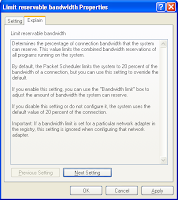
This is a nice little tweak to get 20% band width back.Microsoft reserve
20% of your bradbandwidth for their own purposes(supports for
updates and interrogating your machine etc..)..
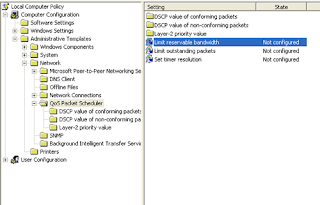
1).Click Starts->Run->type "gpedit.msc"(without quotes).
This opens the group policy editor. Then go to
Local computer policy->Computer configuration->Administative
Templates->Network->Qos packet scheduler->Limit reservable Bandwidth.

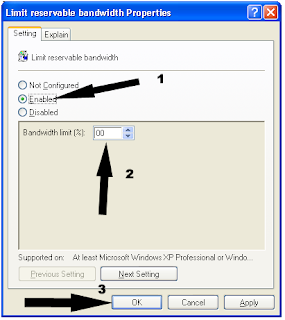
2)Click Enable and Double click on Limit reservable band width and set
it "ZERO"


Hide your IP Proxy Server!!!!

Hi to every one,to day i am going how to hide a IP address proxy server.
First of all we know what is Ip.
IP:"Internet protocol" is the short form of IP.It is te set of techniques
used by many hosts for transmitting data over the Internet.the
current version of the Internet protocol is IPv4,which provides
32-bit address system.
Every device connected to network,be it a local area network(LAN)
or the Internet,is given as Internet protocol number.This address
is used to identify the device uniquely among all other devices
connected to the extended network.
1.Go to
http://www.anonymouse.org/
2.type the website address which you want see after selecting the
language.Then press Enter.
4.Now your viewing the website anonymously.
5.the website admin does not know your IP address.he sees ip address some
port of the world.